The workstation for creators, publishers & managers.

Manage your catalog, pitch your songs, follow up on leads & briefings and keep your network close. All in one Mac app.

Mac with Apple silicon or Intel · macOS 15 or later

Everything you pitch with, in one window

Five views, one click apart, laid out like a classic music library.

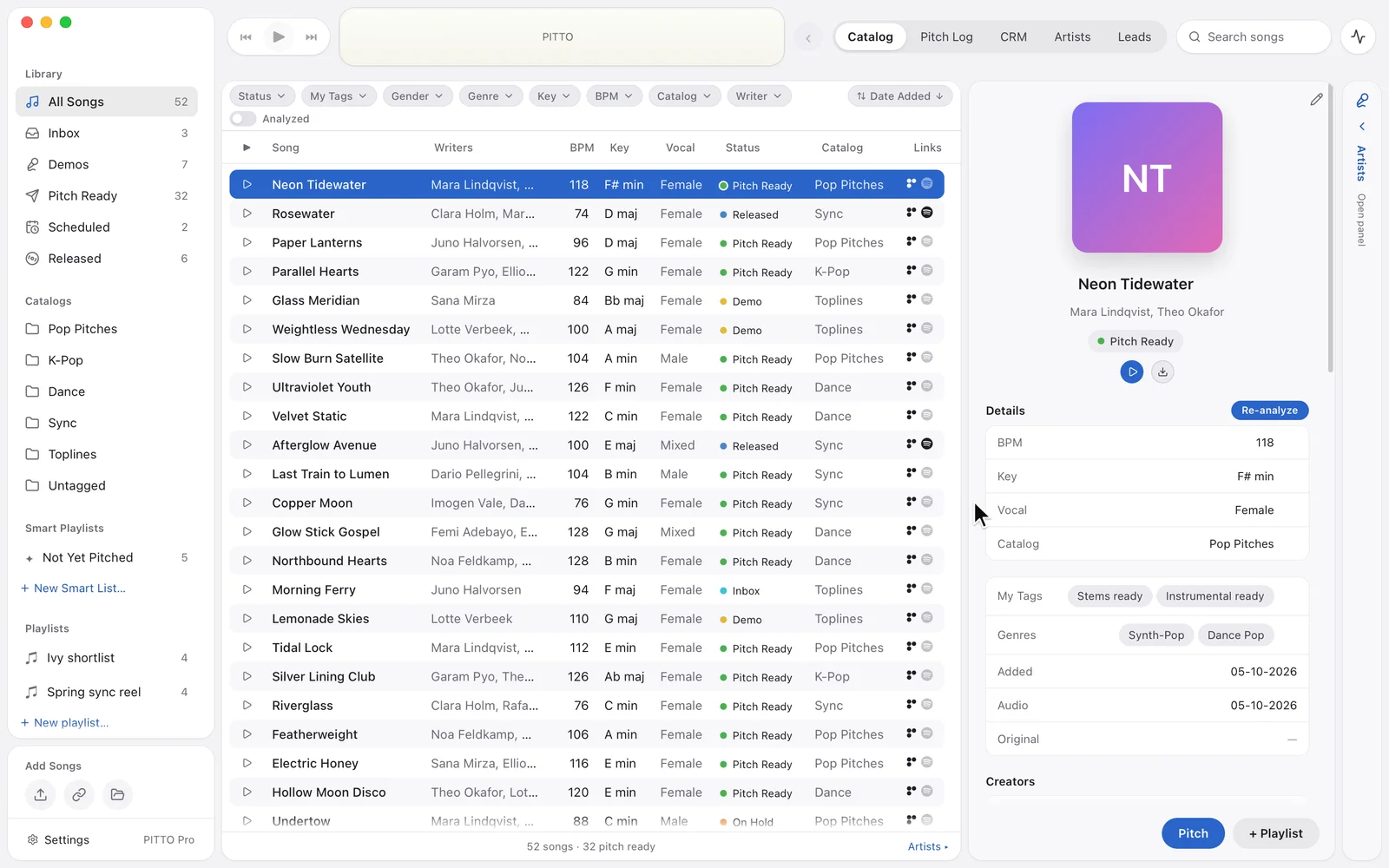
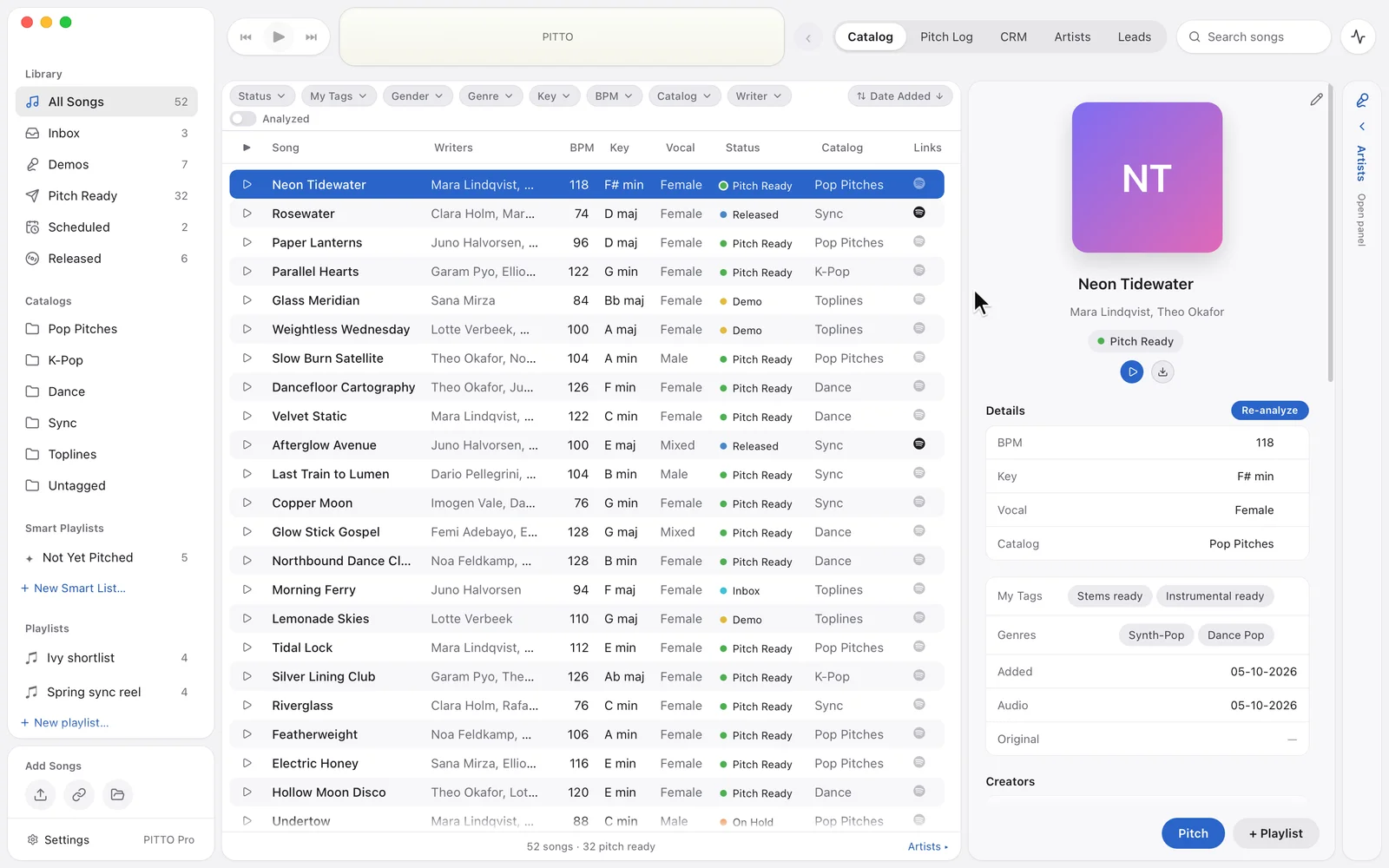
Catalog

Your whole catalog, tagged, searchable and ready to pitch.

  • Every song and its metadata in one sortable list.
  • Tag songs by hand, or let auto-tagging fill in genre, mood, BPM, key and lyrics (Pro).
  • Find any song with keyword search.
  • Add songs by drag and drop, straight from your Downloads folder, or from a Dropbox or DISCO link.
  • Organise songs in catalog folders, playlists and smart playlists.
  • Upload songs to your Postal and Samply accounts, with DISCO* and more to come.

*The DISCO integration requires a DISCO Enterprise plan.
Pitch Log

Every pitch, who it went to, and where it stands.

  • All your pitches in one clear overview.
  • Attach contacts to each pitch.
  • Create a listening link on Postal or Samply.
  • Add notes to your pitches.
  • Build smart lists to keep track of your pitches.

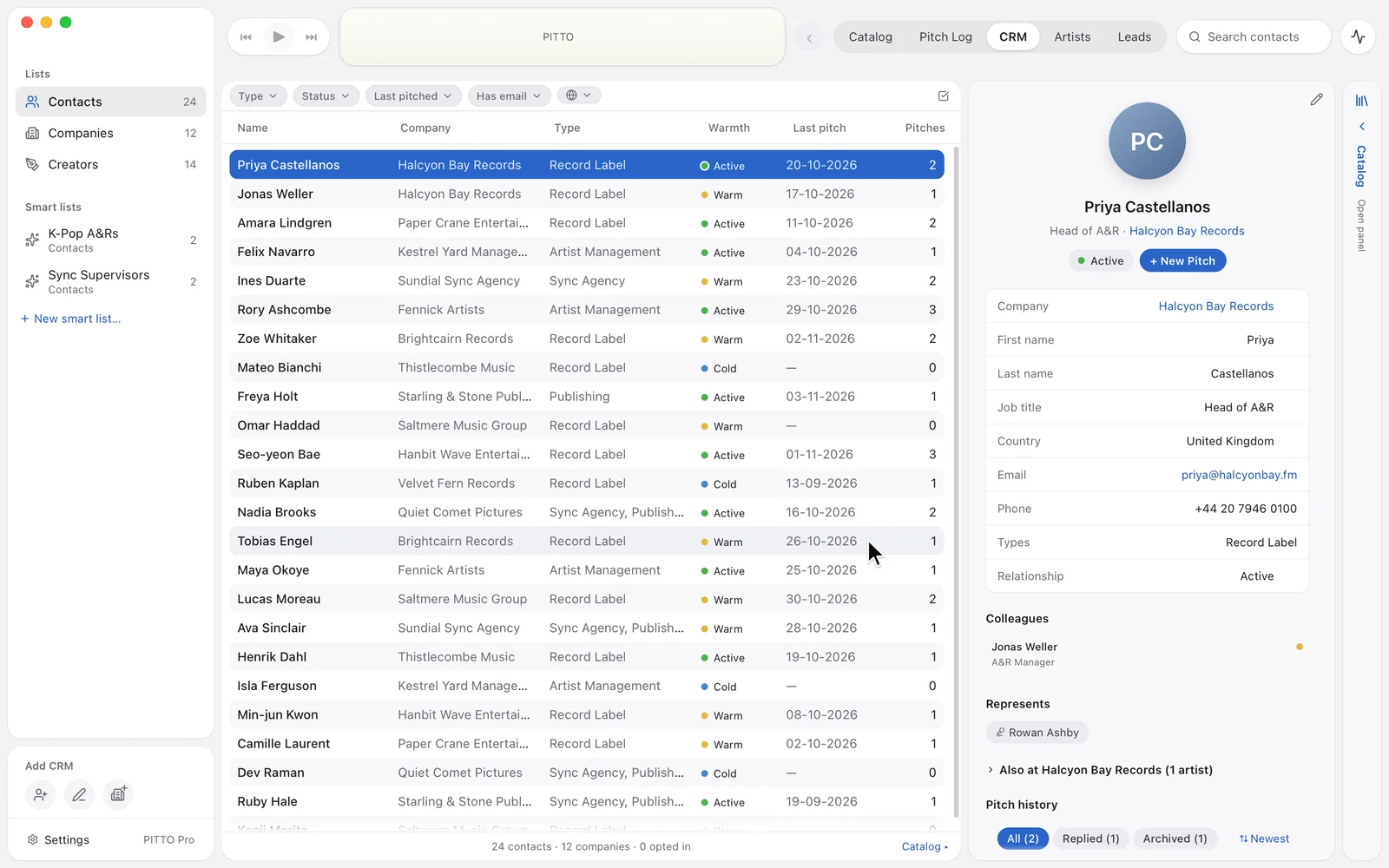
CRM

Manage your network.

  • Add contacts, companies and creators.
  • Dive into a contact’s roster.
  • Start a new pitch from a contact, based on what they need.
  • See what you pitched to whom and when, and how warm each relationship is.

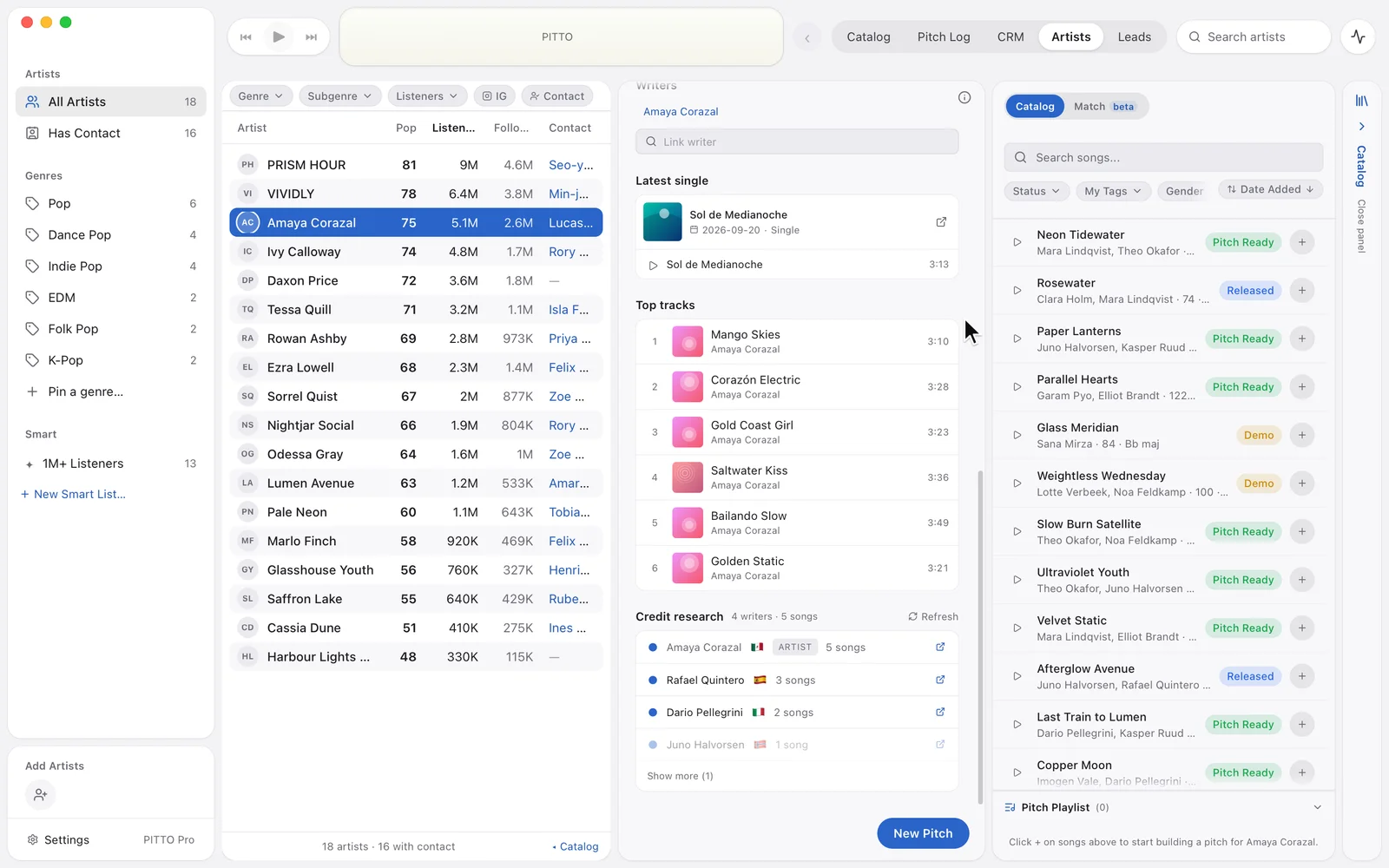
Artists

Know who you’re pitching for.

  • 4,000+ pre-loaded artists, with their stats.
  • Keep the artists you pitch for in one list, with their genres and country.
  • Link contacts and companies to artists.
  • Listen to an artist on Spotify right next to your own catalog, in the same player.*

*Needs Spotify Premium and your own Spotify key.

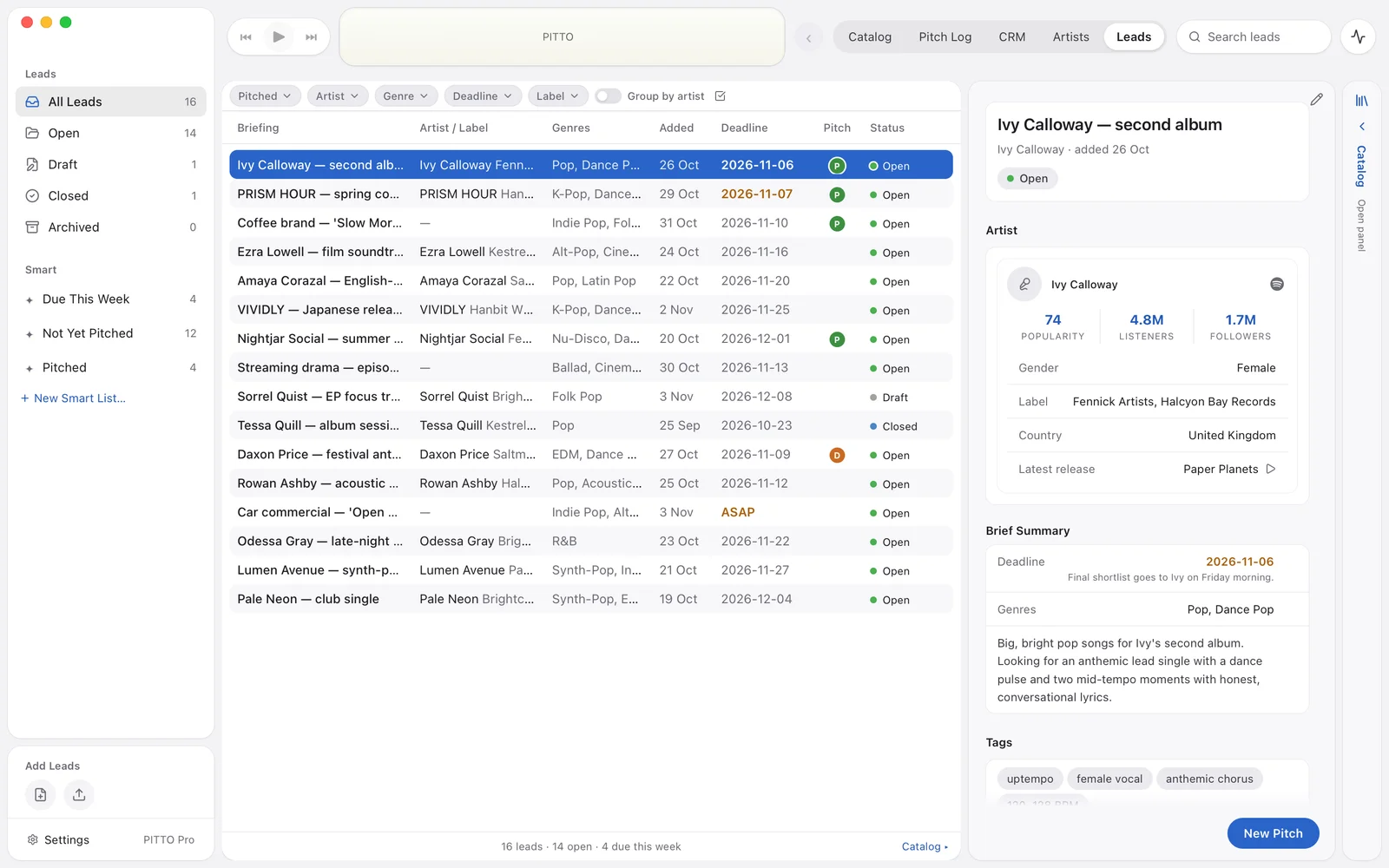
LeadsPro, included in PITTO Pro

Turn briefings into leads, and leads into pitches.

  • Add briefings by hand, or upload a PDF.
  • PITTO reads the PDF and splits it into leads per direction, with their reference tracks.
  • Auto-match songs from your catalog to find the right fit.

Leads come with PITTO Pro. Reading a PDF uses 1 credit; song matching is included and works on analysed songs.

Integrates with

  • DISCO
  • Postal
  • Samply

with more to come

Your library stays on your Mac

Songs, audio, contacts and pitches live on your own Mac, so PITTO keeps working when you’re offline. Export your whole catalog with its audio and metadata whenever you like.

PITTO checks its licence online at least once every 14 days. Song analysis and reading briefing PDFs need a connection. On PITTO Pro, adding a second Mac moves your library to your private cloud library, only after you agree; after that, making changes needs a connection.

Your catalog and audio
On your Mac
Without internet
Keeps working
Usage tracking
None
PITTO doesn’t record how you use the app.
Export
Any time, with audio and metadata

PITTO Free or PITTO Pro

Start free on your own Mac. Go Pro for unlimited songs, Leads, the smart features and a second Mac.

PITTO Free

€0forever

Everything runs on your own Mac.

Get PITTO free
  • Up to 250 songs
  • Catalog, Pitch Log, CRM and Artists
  • 4,000+ pre-loaded artists
  • Switch smoothly between Spotify and your songs*
  • Postal, Samply and DISCO integrations
  • Full export, any time

*Needs Spotify Premium and your own Spotify key.

One Mac. No card needed.

PITTO Pro

Recommended

€19,99/ month

The smart tools, with your library on your Mac.

Get PITTO Pro

Everything in Free, plus:

  • Unlimited songs
  • Leads, with briefing PDFs read for you
  • Song analysis and matching
  • 50 credits a month
  • 250 extra credits after your trial
  • Add a second Mac

14-day free trial, card required. Yearly is two months free.

PITTO Teams

Coming soon

from€29,99/ month

2 seats included · +€12,99 per extra seat

PITTO for your whole team.

Get notified about Teams

Everything in Pro, plus:

  • One shared team catalog
  • Keep songs private or share them
  • Own seat for every member
  • 50 credits a month per member
  • Invite and manage your team

Features and pricing may change before release.

Compare all features

Questions

Something else? Email support@pitto.music.

What does PITTO cost?
PITTO Free costs nothing: one Mac, up to 250 songs, no card needed. PITTO Pro is €19,99 a month or €199,99 a year. 14-day free trial, card required. Yearly is two months free.
Which Macs does PITTO run on?
Macs with Apple silicon or an Intel processor, on macOS 15 or later.
What happens when I reach 250 songs on PITTO Free?
Everything you already have stays usable. You just can't add more songs, unless you remove some or move to PITTO Pro, which has no song limit.
Does PITTO work offline?
Yes. Your catalog lives on your Mac, so you keep working without a connection. PITTO checks its licence online at least once every 14 days. Song analysis and reading briefing PDFs need a connection, and so does making changes to a cloud library.
Where is my data stored?
On your own Mac, on both plans. On PITTO Pro, adding a second Mac asks you first, then moves your library to your private cloud library so both Macs see the same catalog. Details are in the privacy policy.
What are PITTO credits?
Song analysis and reading a briefing PDF use credits: 1 credit per song or PDF. Song matching is included and works on analysed songs. PITTO Pro: 50 credits included every month (1 credit = €0,04). Packs: €20 for 500, €40 for 1000, never expire. 250 extra credits with your first paid month. They never expire.
Can I take my catalog with me?
Yes. Export your full catalog with its audio and metadata at any time, on both plans.
What happens if I stop PITTO Pro?
After you stop, PITTO carries on as PITTO Free on one Mac. With a cloud library, your catalog comes back onto your Mac and you can download your audio for 30 days.
Do I need a Spotify account?
No. PITTO works fully without Spotify. With Spotify Premium and your own Spotify key, you can listen to artists in the same player.

More answers in the Help centre →

Start with PITTO Free

Free on one Mac for up to 250 songs. No card needed.

Mac with Apple silicon or Intel · macOS 15 or later